The channel begins
Let's Tape It joined YouTube on December 16. The channel's own description frames each upload as covering a memory and letting go of part of a life.
A field guide to the quiet art of covering what the hands can hold, listening for what the object remembers, and letting its old meaning loosen one strip at a time.
Three entry points into the archive: the first documented episode, the series' tape-on-tape statement, and the newest documented upload.
The roll turns, the surface disappears, and the object becomes a small altar to impermanence. An early title often names the memory, idea, or feeling ready to travel more lightly.
Let's Tape It joined YouTube on December 16. The channel's own description frames each upload as covering a memory and letting go of part of a life.
The oldest documented run pairs ordinary objects with terse themes: a motherboard with “Motherbored,” a Dreamcast with regret, a disco ball with confusion.
Episodes expand from quick studies into longer endurance pieces. A tennis ball runs 45 minutes, while The Quran reaches 1 hour 44 minutes.
Recent documented subjects include Narcan, fake plants, a ceiling, a Taco Bell directory, and a hard hat. The objects change, the ritual holds.
Cover the object.
Release the hold.
Because an ordinary object can become a teacher when we finally stop rushing past it. The tape gathers like a silver tide, the familiar surface recedes, and attention moves from what the thing does to what it has quietly carried.
Pull. Press. Smooth. Breathe. The repetition becomes a small ceremony, part preservation, part concealment, part peaceful farewell. Nothing must be smashed or denied. The object remains while its old claim on us is allowed to soften.
One object, one material, one patient action. Within that little rule, the titles, pauses, textures, and private associations have room to rise and pass away. Minimalism here is not emptiness. It is enoughness.
One episode is a household thing under tape. Together they become a constellation of electronics, furniture, food, tools, gifts, jokes, worries, and memories. No single object explains the person. Each simply shines for a moment, then makes room for the next.
Jonathan has described loud sounds as locks that can fasten memories in place. The rip of tape answers with a different kind of noise: brief, chosen, and followed by quiet. In the lore of the show, each tear marks a boundary. The memory is not denied, but it no longer gets the whole room.
Elsewhere, water is drunk, carrots are eaten, technology is examined, and old shows live again in the Moldytoaster archive. Here, the motion turns inward. Let's Tape It is the quiet direction: a practice of looking at what remains, wrapping it with care, and releasing the need to make every object explain itself.
Scroll turns the roll. The strip grows. The action stays the same while the meaning changes with every object.
The series works as process, portrait, and accumulating archive - all at once.
The physical choreography matters: pull, press, smooth, tear, repeat. The labor is the structure.
Many episode titles pair an object with a second phrase. That collision is often where the emotional story begins.
Tape conceals, but it also records every edge and contour underneath. Covering becomes another way of remembering.
Every episode distills a complicated feeling into four visible movements. Each object resists in its own way, as all things do before they are ready to change. Scroll gently and let the silver strips complete the teaching.
Notice the ordinary thing that keeps asking for your attention. Meet it without judgment.
Tension enters the roll, then leaves through the hands. Distance becomes one patient strip.
Every new angle hides a detail and reveals the shape beneath. Both truths may coexist.
The object remains. Its old purpose rests, and the hands are free to open again.
The archive rewards the unhurried eye. Titles rhyme with objects, repeated materials become small mantras, and contradictions are allowed to remain without being solved.
Peel the three notes. Read them like fortunes from a very practical tape guru.New tools and readings built from the catalog data itself. Every number below is counted from the episodes and taped objects listed on this site.
The address after the # sign does not match a tab or an episode in this archive. Nothing is broken. Head back to solid ground:
Three starter episodes picked from the real catalog: one short, one medium, one long.
Rotates by date through the catalog in episode order.
One taped object picked by the week number, shown with its taped frame.
Lore and interpretation, pulled from one real episode description on this site each time the page loads.
Type a word, then pick a result. Results are grouped into episodes, essays, and Tape Lab sections.
Bars use patterns as well as color, and every bar carries its number, so the chart never relies on color alone.
The highest numbered episodes in the catalog.
Television spotlight, in large type: Daniel Tosh interviewed Jonathan about wrapping everyday objects in tape on Tosh.0. It remains the show reference point most viewers meet first.
Each essay heading below jumps straight to that essay. Reading time is estimated from the essay word count.
Browse, filter, queue, and compare every cataloged video.
Wrap challenges, quizzes, games, and hands on tape tools.
All 249 taped frames, shuffled. Tap a card to reveal what is under the tape.
Let's Tape It is a series where one object at a time gets wrapped in clear packing tape while the title pairs it with a memory, a theme, or a feeling.
Jonathan Harchick. He is also behind Jon Drinks Water, Tech Thursday, and Jon Eats Carrots, and the Moldytoaster archive of his older shows. Links to all of them are at the bottom of this page.
Let's Tape It joined YouTube on December 16, 2009.
Counted live from the catalog data when the page loads.
A game built from real stills taken from the episodes. There are 249 taped objects: each card shows the object wrapped in tape, and revealing the card shows the object with its name. You can flip through all 249 freely, or play a scored set of 10 rounds.
Open the Episodes tab and pick any card to read its episode page and watch the embedded video, or use a Watch on YouTube link to open the episode on YouTube instead.
Titles, durations, tags, and view counts come from the documented channel research described in the credits at the bottom of this page. The guessing game frames come from stills of the taped and untaped objects in the episodes.
No. This is a fan archive. The official channel is linked in the footer.
Every idea from the upgrade list, grouped the same way as the list itself. Open a group to read the full set.
Browse the documented archive. Each thumbnail opens a dedicated episode page with an embedded video, object notes, interpretation, related episodes, and details hidden in the text.
This expanded guide combines exact titles found in the channel’s oldest, newest, and owner-playlist views, researched October 3, 2026. Every listed entry has its own long-form reading; 190 have a playable embed, and every embed ID was checked against YouTube again when this page was built on October 28, 2026. The public channel reports 289 total uploads, including non-series videos, and deeper archive rows that YouTube did not expose reliably are not invented here. See the full channel on YouTube.
Plain instructions: pick any combination of sort, category, tag, and duration. The filters work together, and the Clear all filters button resets every one of them, including the search box and era menu above.
Try removing one filter at a time. Start with the one you picked last, or jump in with a popular tag:
Bigger type and a bigger count mean the tag appears on more episodes. Pick a tag to filter the grid.
This search also looks through object names and the episode description text written for this archive, not just titles.
Queue, favorites, comparisons, and printed lists. Your lists are stored only in this browser.
0 of 0 watched.
Use the Compare button on any two episode cards, then read them side by side here.
No episodes picked yet. Pick two cards above to compare title, object, duration, category, and tags.
Groups built from the object names in the guessing game manifest, matched against the catalog.
Every taped object in the guessing game set, in alphabetical order.
These catalog episodes have no taped and untaped frame pair in the guessing game set, so they sit outside the standard taping game. Some are playlist finds or expanded archive entries rather than standard numbered tapings.
A clean black and white list of every title in the catalog, with empty boxes to tick off by hand.
Put the archive's core gesture in your hands. Pick an object, choose a tape, then drag across the workbench. Your composition lasts only for this visit.
Each tape has its own color and pattern, so the styles stay distinct without relying on color alone.
Match each object with the theme used in its episode title.
Which archive shelf fits this object?
More games and tools, all generated from the real catalog. Scores and logs on this page are stored only in this browser.
No saved best yet. Play the 20 second wrap challenge above and your best score will be kept here.
Pick the episode with the lower episode number.
Mixed questions about objects, durations, and categories. How long a streak can you build?
Roll the die and land on an episode number, then open that episode.
?
Spin to land on a category, then open a random episode from it.
Match pairs of real taped frames from the episodes. Pick a board size, then flip cards two at a time.
Enter a time budget in minutes. The builder fills it with episodes whose durations add up to just under the budget. Pick a category to build a category marathon instead.
Five random episodes with their total runtime. Reshuffle for a fresh set of five.
A 5 by 5 card of taped objects. Print it and play along while watching.
Ten random objects to hunt down in the archive. Tick each one off when you find its episode.
Questions on the front, answers with episode numbers on the back. Print the sheet and cut along the rows.
Pick a tape type to list real episodes whose titles or tags mention that type of tape or wrapping.
Formula used: surface area of a box shape, times 1.5 for overlap, divided by one roll of tape 2 inches wide and 55 yards long (about 3,960 square inches of tape per roll).
A clearly fake title generator: a real object from the manifest plus a title pattern borrowed from real episodes. These are made up, never real episodes.
Taped something at home? Log it here. Entries stay in this browser only.
Every card below is a real frame from an episode, with the object already wrapped. Tap a card, or press Space or Enter on it, to reveal the untaped object and its name. Tap again to hide it. Scores live in this session only, unless you save a best in the browser leaderboard.
Revealed 0 of 249
Pick a mode and filters, then start a set. Sets run 10 rounds. Keyboard play: keys 1 to 4 pick a choice, Enter reveals, and N moves to the next frame.
15
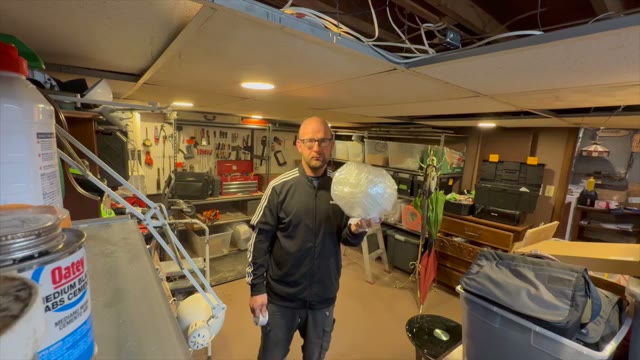
The full shuffled deck. Reveal any card at your own pace. This grid is practice play: flipping cards here does not change your score.
Every choice here is saved in this browser only. Press Reset to defaults to undo all of them.
The easy reading font switches body text to a widely spaced sans serif with extra line height. Short lines limits essay lines to about 65 characters.
Keyboard shortcuts: press the question mark key anywhere for the shortcut list. In the guessing game, keys 1 to 4 pick a choice, Enter reveals, and N goes to the next frame. The slash key jumps to episode search, and R plays a random episode, when you are not typing in a box.